Keyword mapping is the process of assigning relevant search keywords to specific website pages based on their topic, search intent, and business purpose. While keyword research helps you discover what your audience searches for, keyword mapping determines which pages should target those searches. A clear map helps you organise existing content, identify missing pages, and reduce unnecessary competition between your own URLs.
| Mapping element | Purpose | Expected result |
|---|---|---|
| Primary keyword | Defines the main search topic | Clear page focus |
| Supporting keywords | Covers relevant variations | More complete content |
| Search intent | Identifies what users want | Appropriate page type |
| Target URL | Connects keywords to content | Defined page ownership |
| Recommended action | Identifies the next SEO task | Practical content plan |
Why Is Keyword Mapping Important for SEO?
A website may have hundreds of relevant keywords but still struggle to organise its content. Without a clear strategy, multiple pages may target similar searches, while valuable topics remain uncovered.
SEO keyword mapping helps solve these problems by connecting keyword research with your website structure. Its main benefits include better page relevance, clearer content priorities, improved internal linking opportunities, and easier identification of potential keyword cannibalisation.
It also makes collaboration simpler. Writers know which topics belong on each page, while SEO managers can track which URLs need optimisation and which new pages are worth creating.

How to Create a Keyword Map: Step-by-Step
Step 1: Audit Your Existing Website Pages
Start by creating a list of your website's important URLs. Include service pages, product pages, categories, landing pages, and blog articles.
You can collect URLs using your XML sitemap, a website crawler such as Screaming Frog, or your content management system.
Record each URL alongside its current page title, content type, and status. This inventory prevents you from recommending a new page when an existing URL could already serve the same search intent.
Step 2: Collect Keywords and Search Performance Data
Combine keyword research with information about how your website currently performs.
Google Search Console is particularly useful because its Performance report shows the queries that generate impressions and clicks for your website.
To identify which pages appear for a particular keyword:
- Open Performance > Search results in Google Search Console.
- Select the Queries tab and choose a relevant search term.
- Switch to the Pages tab to see which URLs appeared for that query.
- Record the relevant URLs, impressions, clicks, and other useful observations.
You can also filter by a specific URL to see the queries associated with that page. Keep in mind that Search Console does not disclose every search query.
Complement this information with tools such as Ahrefs, Semrush, or Google Keyword Planner to discover additional opportunities. Search volume and keyword difficulty estimates should guide your decisions rather than determine them automatically.
Step 3: Group Keywords by Search Intent
Not every keyword needs its own page. Several variations may represent the same search intent and can often be addressed together.
For example, these keywords could belong to one service page:
- bike repair service
- bicycle repair shop
- bike repairs near me
However, how much does bike repair cost is primarily informational and may work better as a supporting article.
Before grouping keywords, review the search results for each important term. If the same types of pages consistently appear and satisfy the same user need, grouping those terms is often appropriate.
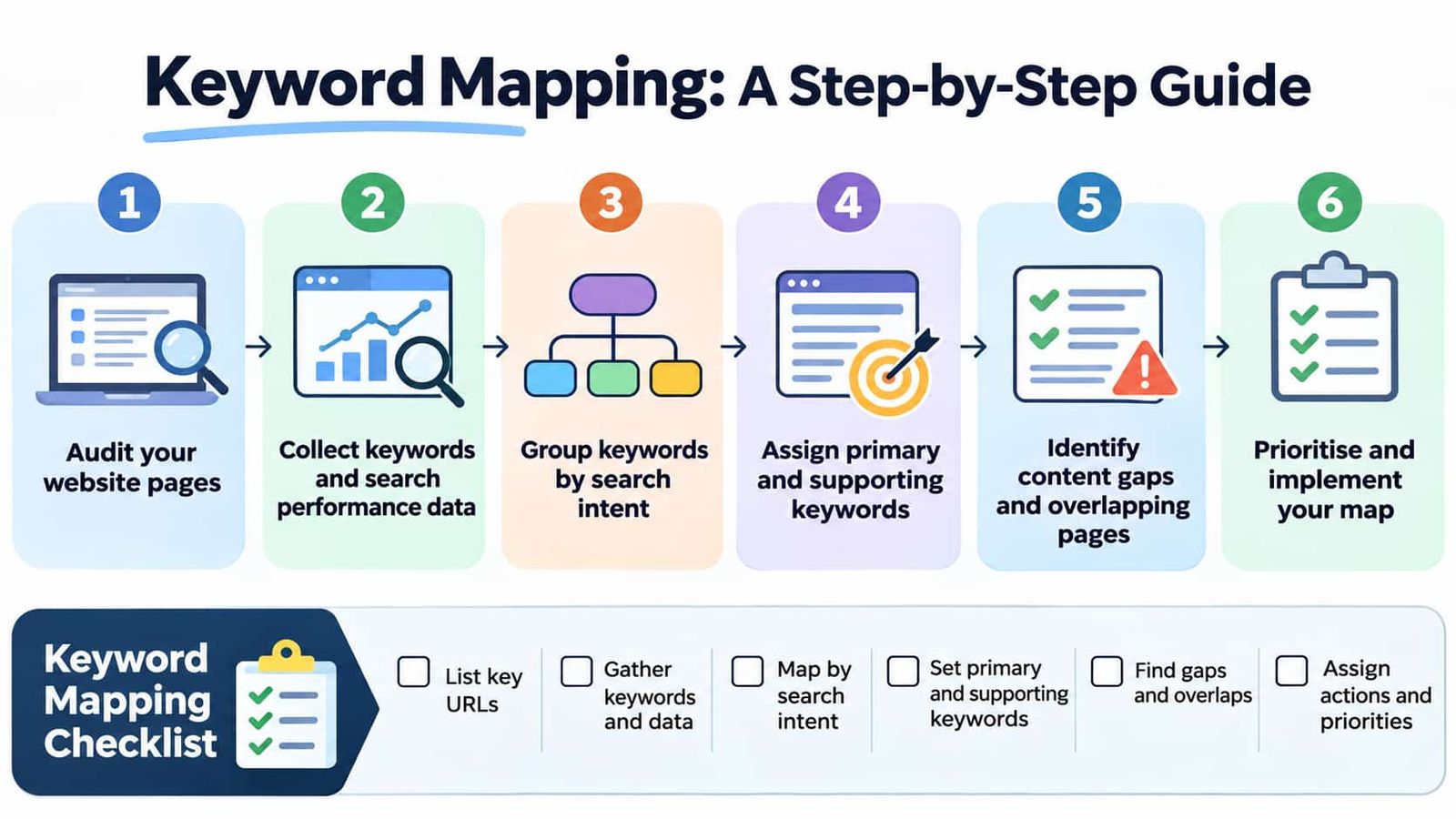
Step 4: Assign Primary and Supporting Keywords
Once you have established your keyword groups, select the most relevant existing URL for each cluster.
Choose one primary keyword that best represents the page's main purpose. Add supporting keywords that naturally fit the same topic.
For example, a bicycle repair service page might use:
Primary keyword: bike repair service
Supporting keywords: bicycle repair shop, bike repairs near me, bicycle servicing
The primary keyword can inform the page title, H1, and main content, while supporting variations can be incorporated naturally throughout the page.
Avoid forcing unrelated keywords into a single page simply because they share similar wording.
Step 5: Identify Content Gaps and Overlapping Pages
Compare your keyword clusters against the URLs you collected during the website audit.
A content gap exists when an important search topic has no suitable page. For example, a bicycle retailer may have several product categories but no helpful guide to choosing the correct helmet size.
Before proposing new content, check whether an existing article can be expanded to satisfy that intent.
Also look for potential keyword cannibalisation. If multiple URLs appear for the same important queries, investigate whether they serve distinct purposes or unnecessarily duplicate each other.
Multiple ranking URLs do not automatically indicate a problem. When genuine overlap exists, possible actions include improving page differentiation, consolidating duplicate content, or redirecting a redundant URL where appropriate.
Step 6: Prioritise and Implement Your Keyword Map
Assign an action and priority to every mapped page. Some URLs may only need improved headings, clearer content, or additional internal links. Others may require substantial updates or new content.
Prioritise opportunities based on relevance, business value, existing performance, effort, and realistic search potential.
A completed keyword map should function as an actionable SEO plan rather than simply a keyword list.
Keyword Mapping Example: A Completed SEO Map
Consider a fictional bicycle retailer offering repair services, selling cycling equipment, and publishing educational articles.
The following keyword mapping example illustrates how different types of keywords can be assigned to appropriate pages.
| Target URL | Primary keyword | Supporting keywords | Search intent | Page type | Recommended action |
|---|---|---|---|---|---|
| /services/bike-repair/ | bike repair service | bicycle repair shop, bike repairs near me | Local commercial | Service | Improve existing page |
| /services/e-bike-repair/ | e-bike repair | electric bike servicing, e-bike mechanic | Local commercial | Service | Improve service content |
| /shop/bike-helmets/ | bike helmets | cycling helmets, buy bike helmet | Transactional | Category | Optimise category |
| /shop/road-bikes/ | road bikes | buy road bike, road bicycles | Transactional | Category | Improve category content |
| /blog/bike-repair-cost/ | bike repair cost | bicycle repair prices, repair costs | Informational | Blog | Update existing guide |
| /blog/how-to-choose-bike-helmet/ | how to choose a bike helmet | helmet sizing, helmet fit guide | Informational | Blog | Improve and internally link |
| /blog/e-bike-battery-care/ | e-bike battery care | battery maintenance, battery storage tips | Informational | Blog | Create after content audit |
What This Example Demonstrates
The repair service pages target users looking for professional assistance, while product categories serve users interested in purchasing cycling equipment.
The blog articles answer informational questions and can direct readers towards relevant commercial pages through internal links.
Notice that the general bicycle repair service page and the repair cost article cover related subjects without necessarily competing for the same primary intent.
This separation helps create a logical website structure while allowing related pages to support one another.
Free Keyword Mapping Template and PDF
You do not need expensive software to organise your first keyword map. An editable spreadsheet is often sufficient, particularly for small and medium-sized websites.
A practical template should include the target URL, primary keyword, supporting keywords, search intent, page type, and recommended action. Additional columns for priority, owner, performance evidence, and possible overlaps make it easier to manage ongoing SEO work.
Download the Keyword Mapping Resources
Download the Editable Keyword Mapping Spreadsheet
This Excel template includes a completed keyword map, a blank worksheet for your own website, and instructions for organising keyword groups. It can also be imported into Google Sheets.
Download the Keyword Mapping PDF Worksheet
The printable PDF includes a six-step workflow, a completed example, a blank keyword mapping table, and a short pre-publication checklist.
To use either template, start with your existing website URLs, add the relevant keyword groups, and record a recommended action for each page. Keep the file updated as content changes or new keyword opportunities emerge.
Best Keyword Mapping Tools
Several free and paid tools can support different parts of the keyword mapping process.
| Tool | Best use | Key consideration |
|---|---|---|
| Google Search Console | Discover existing queries and ranking URLs | Does not show all search queries |
| Google Sheets or Excel | Build and maintain an editable keyword map | Keyword assignments require manual review |
| Ahrefs | Keyword discovery, Parent Topics, competitor research | Metrics and automated groupings need validation |
| Semrush | Keyword clustering and content planning | Advanced features require paid access |
| Screaming Frog | Audit existing URLs and website structure | Desktop crawler requires setup |
Google Search Console
Google Search Console is an excellent starting point for existing websites because it provides actual Google Search performance data.
Its query and page reports help you understand which URLs already receive search visibility. This information can reveal opportunities to improve underperforming pages or investigate possible keyword overlap.
Ahrefs and Semrush
Ahrefs Keywords Explorer can help identify related searches and broader parent topics. Semrush Keyword Strategy Builder can organise keywords into clusters and suggest broader content structures.
These keyword mapping tools can save research time, but their recommendations should be checked against actual search results, user intent, and your existing website content.
Google Sheets and Excel
Spreadsheets remain particularly useful because they give you complete control over your keyword assignments.
You can filter by page type, sort by priority, track completed actions, and share the document with writers or developers.
For many businesses, combining a spreadsheet with Google Search Console provides a practical starting point without requiring a dedicated keyword mapping platform.
Common Keyword Mapping Mistakes to Avoid
Even a well-organised spreadsheet can lead to poor decisions if the mapping process is rushed.
Common mistakes include:
- Creating a page for every variation: Group keywords with matching intent instead of publishing unnecessary near-duplicate pages.
- Assigning unrelated keywords together: Focus on topical relevance rather than maximising the number of keywords per page.
- Ignoring existing URLs: Audit published content before deciding that a new page is required.
- Overlooking cannibalisation: Investigate overlapping topics and search visibility before publishing competing content.
- Relying only on search volume: Consider intent, business relevance, and content quality alongside keyword metrics.
Keyword mapping is intended to improve strategic decisions, not guarantee higher rankings.
How Often Should You Update Your Keyword Map?
A keyword map should evolve alongside your website.
Review it whenever you launch new services, add major categories, publish content targeting new topics, restructure URLs, or complete a website migration.
A quarterly review can be a useful starting point for an active website, although larger or faster-changing websites may need more frequent updates.
During each review, compare your planned assignments with current Search Console data. Identify pages that have gained unexpected query visibility, topics that require additional coverage, and older articles that may overlap with newer content.
Keep the map connected to your content calendar so that every new SEO brief has a defined keyword cluster and target page.
Frequently Asked Questions
What Is the Difference Between Keyword Research and Keyword Mapping?
Keyword research identifies relevant search terms, their intent, and estimated demand. Keyword mapping assigns those keywords to specific website pages and determines how they should be targeted.
Both processes work together to create an organised SEO content strategy.
Can One Page Target Multiple Keywords?
Yes. One page can target a primary keyword and several supporting variations when they share the same search intent.
The goal is to create a useful page that answers a complete search need, rather than creating separate pages for every closely related phrase.
Does Keyword Mapping Prevent Keyword Cannibalisation?
Keyword mapping can reduce unnecessary overlap by giving pages clearer roles and identifying competing content before publication.
However, it does not eliminate every instance of overlap or guarantee that Google will display only the intended URL.
Do I Need Paid Tools for Keyword Mapping?
No. Google Search Console, a spreadsheet, and manual search-result analysis can provide a useful foundation.
Paid tools can help expand keyword research, analyse competitors, and automate parts of the clustering process, particularly on larger websites.
Build a More Organised SEO Strategy
Effective keyword mapping connects your keyword research with the pages that can best satisfy each search intent. By auditing existing URLs, grouping related terms, assigning clear targets, and reviewing content gaps, you can develop a more focused and manageable SEO strategy.
Start with the downloadable template, map your most important service or category pages, and gradually expand your strategy as new opportunities emerge.
Need help organising your SEO strategy? Explore WebLikeWeb’s keyword research services to identify relevant keywords and map them to the right pages.