Setting a Google Ads monthly budget starts with understanding your business goals, expected advertising costs and how much you can afford to spend acquiring customers. There is no universal budget that works for every Australian business. A local service provider, an ecommerce retailer and a growing startup may need different amounts depending on competition, conversion rates and available resources. The best approach is to calculate an initial budget, test performance and adjust spending based on measurable results.
The following scenarios are illustrative planning examples, not Australian market benchmarks or guaranteed outcomes.
| Monthly Ad Spend | Assumed Average CPC | Estimated Clicks | Campaign Purpose |
|---|---|---|---|
| A$900 | A$3 | 300 | Test a targeted Search campaign |
| A$2,400 | A$6 | 400 | Generate leads from high-intent searches |
| A$6,000 | A$5 | 1,200 | Support multiple campaigns and ecommerce growth |
Actual clicks and conversions will depend on your industry, targeting, competition and campaign performance.
Understanding Google Ads Monthly and Daily Budgets
Google Ads generally uses average daily budgets rather than a fixed calendar-month amount. You specify how much you are comfortable spending per day on each campaign, and Google distributes that spending according to available advertising opportunities.
For most campaigns using average daily budgets, Google may spend up to twice the daily budget on certain days. However, the applicable monthly spending limit is generally calculated by multiplying the average daily budget by 30.4.
Average daily budget = Planned monthly advertising spend ÷ 30.4
For example, a business planning to spend approximately A1,520permonthwouldsetanaveragedailybudgetofA50.
These limits are subject to Google's billing rules, including adjustments made during a month. Eligible campaigns may also offer a campaign total budget for a specified duration, rather than an average daily budget.
You can review the details in Google's official average daily budget documentation and spending limits guidance.
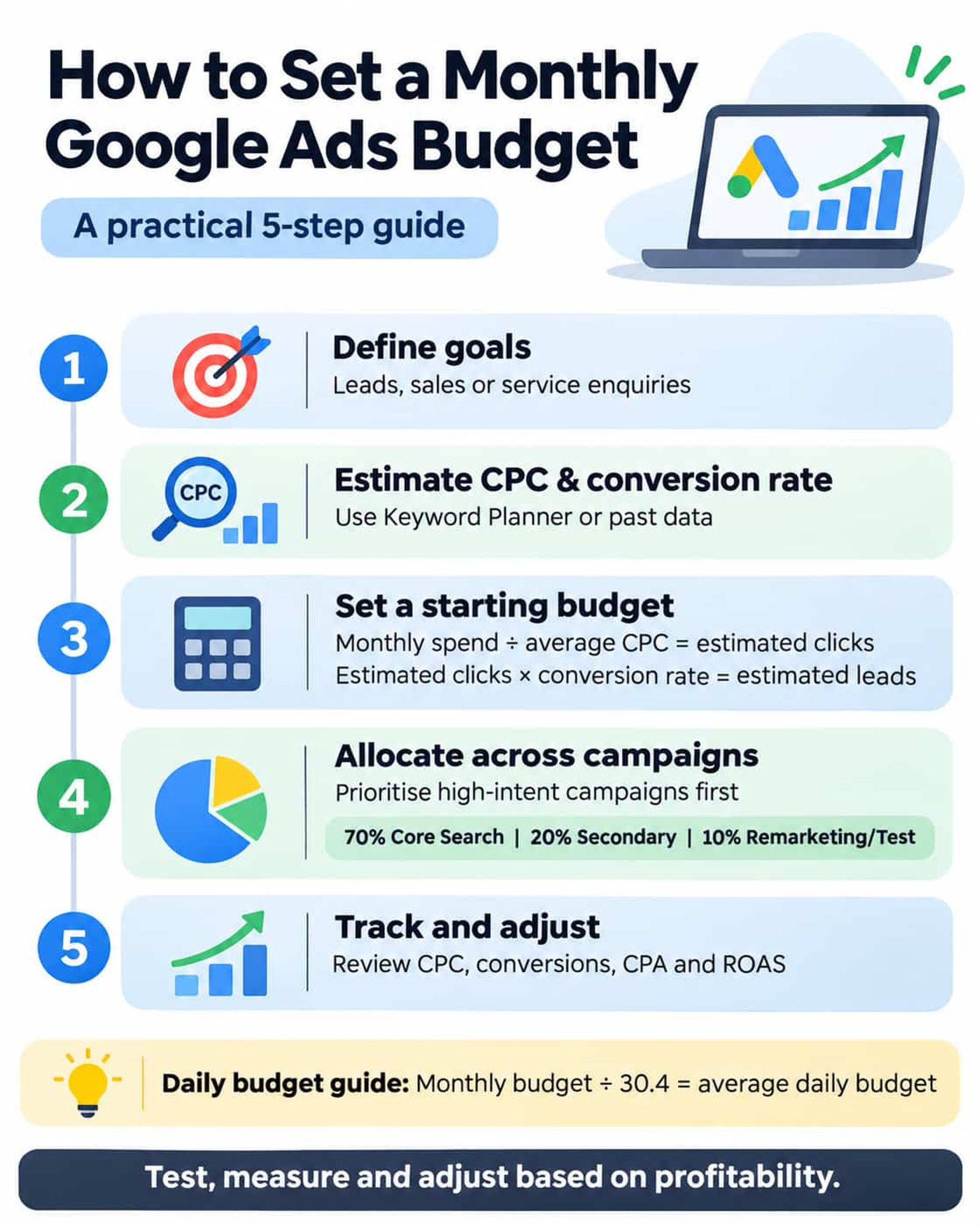
How Much Should You Spend on Google Ads?
Your starting budget should reflect what your business wants to achieve and what each customer is worth. A higher budget can provide more opportunities to attract customers, but it does not automatically deliver better results.
Business Goals and Competition
Businesses seeking local enquiries may begin with a tightly targeted Search campaign. Ecommerce businesses may need a different approach involving Shopping campaigns, product categories and repeat customers.
Competition also affects spending requirements. Advertising in a competitive industry or major Australian city may involve higher click costs than targeting a smaller geographic area.
Use Google Ads Keyword Planner to investigate relevant keywords, estimated traffic and potential costs before choosing your budget.
Customer Acquisition Costs and Available Resources
Your budget must make financial sense relative to the revenue or profit generated by new customers.
For example, a business earning A1,500incontributionprofitfromanewcustomermayhavemoreflexibilitythanoneearningA100 per sale. Consider conversion rates, sales margins, repeat purchases and operating expenses when determining an acceptable customer acquisition cost.
Also distinguish Google Ads spending from management fees. Advertising spend is paid to Google, while agency management, landing page development and other services may involve separate costs.
How to Calculate Your Google Ads Monthly Budget
A practical budgeting method combines estimated click costs, expected conversion rates and your target cost per lead or sale.
Step 1: Define Your Campaign Goals
Start with a measurable objective, such as generating qualified enquiries, increasing online purchases or attracting customers to a particular service.
Your goal determines which conversions matter and how much your business can reasonably spend to achieve them.
Step 2: Estimate CPC and Conversion Rate
Use Keyword Planner, historical campaign data or conservative planning assumptions to estimate your average cost per click (CPC).
Then calculate potential traffic and leads using these formulas:
Estimated monthly clicks = Monthly ad spend ÷ Assumed average CPC
Estimated leads = Estimated monthly clicks × Assumed conversion rate
These estimates are useful for planning, but actual results may vary considerably.
Step 3: Calculate a Starting Budget
Consider an Australian service business using the following hypothetical assumptions:
| Budget Metric | Assumption | Calculation |
|---|---|---|
| Monthly advertising spend | A$2,400 | Starting test budget |
| Average CPC | A$6 | Assumed click cost |
| Estimated clicks | 400 | A$2,400 ÷ A$6 |
| Conversion rate | 5% | Assumed lead conversion rate |
| Estimated leads | 20 | 400 × 5% |
| Estimated cost per lead | A$120 | A$2,400 ÷ 20 |
In this example, the estimated cost per lead is A$120. If the business can profitably acquire leads at that cost, the budget may be reasonable for an initial test.
However, not every lead becomes a customer. If only half the enquiries are qualified and 20% of qualified leads become customers, the business would acquire approximately two customers at A$1,200 each in advertising costs.
This is why customer acquisition economics matter more than click volume alone.
Step 4: Set an Initial Testing Budget
Choose an amount your business can sustain long enough to collect meaningful conversion data. For a new account, avoid spreading a small budget across too many campaigns.
Monitor the results and allow for normal conversion delays before making major decisions. If performance is uncertain, improve tracking, targeting or landing pages before committing additional funds.
For businesses that need help forecasting costs and structuring an initial campaign, WebLikeWeb's Google Ads management services can assist with budget planning, campaign setup and ongoing performance management.
How to Allocate Your Budget Across Campaigns
Once you establish a total budget, distribute spending according to customer intent, campaign performance and business priorities.
For example, a business with A$2,400 per month might use the following starting allocation:
| Campaign Type | Budget Share | Monthly Allocation |
|---|---|---|
| Core high-intent Search campaign | 70% | A$1,680 |
| Secondary service or product campaign | 20% | A$480 |
| Remarketing or controlled testing | 10% | A$240 |
| Total | 100% | A$2,400 |
This allocation is illustrative rather than a standard recommendation. Remarketing depends on having a suitable audience, and very small budgets may perform better when concentrated on one high-priority campaign.
For ecommerce businesses, a larger share may go towards Shopping or Performance Max campaigns where appropriate. Established businesses can use historical conversion performance to determine which campaigns deserve more funding.
How to Track and Optimise Google Ads Spending
Budget planning continues after your campaigns launch. Regular performance reviews help identify wasted spending and opportunities to improve efficiency.

Monitor the Right Performance Metrics
| Metric | What It Measures | Why It Matters |
|---|---|---|
| Clicks | Traffic generated by ads | Shows advertising activity |
| Average CPC | Cost per click | Helps evaluate traffic costs |
| Conversion rate | Percentage of clicks resulting in conversions | Measures how effectively traffic converts |
| Cost per acquisition (CPA) | Advertising cost per conversion | Helps assess acquisition efficiency |
| Return on ad spend (ROAS) | Revenue attributed to ads divided by ad spend | Useful for evaluating ecommerce performance |
For lead-generation campaigns, review lead quality and actual customer acquisition costs alongside reported conversions. For ecommerce campaigns, consider revenue, margins and profitability rather than ROAS alone.
Review Campaign Performance Regularly
Check spending and search terms weekly during initial testing, then conduct a more comprehensive monthly review.
Look for irrelevant search queries, ineffective keywords, poor-performing locations and campaigns that consistently exceed your acceptable acquisition costs.
Google's Performance Planner can also help eligible advertisers forecast how budget changes may affect campaign results. These forecasts are estimates, not guarantees.
For ongoing optimisation, WebLikeWeb's PPC management services provide support with campaign monitoring, conversion tracking, search term analysis and budget allocation.
When Should You Adjust Your Google Ads Budget?
Budget changes should follow performance evidence rather than arbitrary spending targets.
Consider increasing your budget when a campaign consistently generates profitable conversions, has additional relevant demand available and is restricted by its current spending allocation.
Consider reducing your budget when acquisition costs exceed your acceptable threshold or conversions are consistently poor despite sufficient data and optimisation.
Consider reallocating your budget when one campaign generates better-quality leads or more profitable sales than another. Moving funds towards stronger campaigns may improve overall performance without increasing total advertising expenditure.
Avoid making frequent, substantial changes based on only a few days of data. Budget adjustments can affect campaign delivery and automated bidding behaviour.
Common Google Ads Budgeting Mistakes
Avoid these common issues when planning or reviewing your monthly advertising spend:
- Setting a budget without defining conversion goals.
- Expecting guaranteed sales from a specific spending amount.
- Dividing a small budget across too many campaigns.
- Ignoring conversion tracking or lead quality.
- Increasing budgets before addressing poor performance.
- Forgetting agency management fees and related expenses.
A sustainable budget is one that supports measurable business outcomes without creating unnecessary financial pressure.
FAQs About Google Ads Monthly Budgets
Can I Set a Monthly Budget in Google Ads?
Google Ads typically allows you to set an average daily budget for each campaign. For most campaigns, the monthly spending limit is calculated using 30.4 times the daily budget. Eligible campaigns also support total budgets over specified campaign durations, subject to Google's rules.
Is A$1,000 per Month Enough for Google Ads?
A$1,000 may be sufficient to test a narrowly targeted campaign, depending on CPC, search demand and business goals. Highly competitive industries may require more spending to collect useful conversion data.
How Do I Change My Google Ads Budget?
Open Google Ads, navigate to Campaigns and locate the relevant campaign. For an average daily budget, select the edit option in the Budget column, enter the new amount and save the change.
Remember that changing your daily budget during the month can affect your applicable spending limits.
Does a Higher Google Ads Budget Mean More Sales?
Not necessarily. Increasing your budget can create opportunities for more clicks and conversions, but outcomes depend on targeting, competition, conversion rates and customer demand. Higher spending without efficient customer acquisition can reduce profitability.
Does My Google Ads Budget Include Agency Fees?
No. Google Ads campaign spending and agency management fees are separate expenses. Calculate your overall marketing commitment by including advertising costs, management charges and any other applicable services.
Conclusion
A successful Google Ads monthly budget is built around realistic financial goals, informed assumptions and continuous performance monitoring. Start by estimating click costs and conversion rates, calculate an affordable testing budget and prioritise campaigns most closely aligned with your business objectives.
As campaign data becomes available, adjust spending according to conversion quality, acquisition costs and profitability rather than traffic volume alone.
For Australian businesses seeking professional guidance, WebLikeWeb provides Google Ads and PPC management services to help plan, monitor and optimise advertising budgets.
Official Google Ads References