
A website can have excellent content and still struggle in search results if search engines cannot crawl, render, or index its pages correctly. Broken links, indexing restrictions, slow loading times, and incorrect redirects are common technical SEO issues that can affect website visibility and user experience.
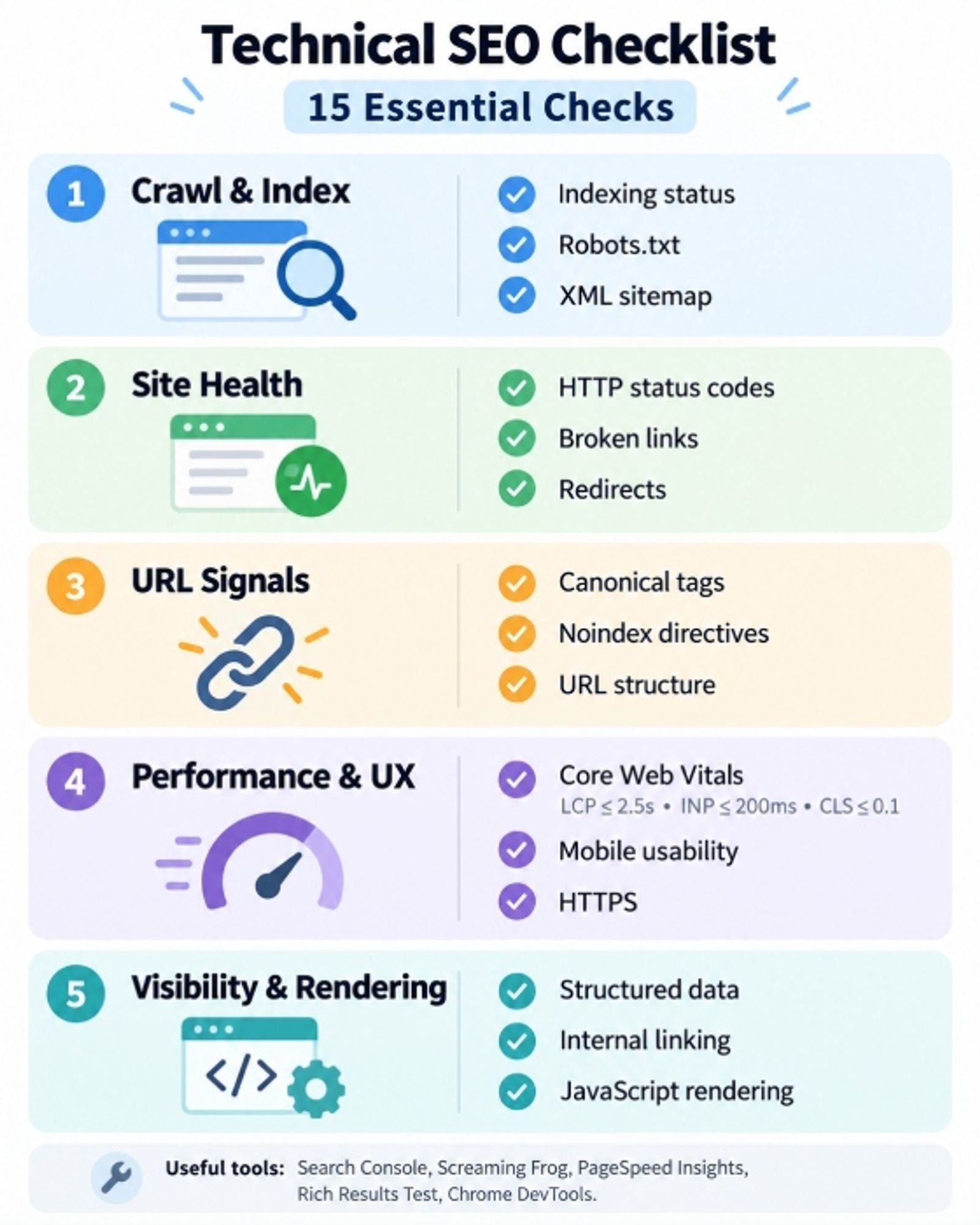
This technical SEO checklist covers 15 essential checks to help website owners, marketers, and SEO specialists identify problems and improve their websites. Each step explains what to examine, which tools to use, and how to resolve common issues. You can also download our Technical SEO Audit Checklist PDF to record your findings and track improvements.
Technical SEO Checklist: 15 Essential Checks
Use this table as a starting point for your technical SEO audit checklist. It highlights the recommended tools, common issues, and general priority of each check.
| # | Technical SEO Check | Recommended Tool | What to Look For | Priority |
|---|---|---|---|---|
| 1 | Indexing status | Google Search Console | Important pages not indexed | High |
| 2 | Robots.txt | Browser, Search Console | Unintentionally blocked URLs | High |
| 3 | XML sitemap | Search Console | Missing or outdated URLs | High |
| 4 | HTTP status codes | Screaming Frog | Unexpected 4xx and 5xx errors | High |
| 5 | Broken links | Screaming Frog | Links pointing to missing pages | Medium–High |
| 6 | Redirects | Screaming Frog | Chains, loops, incorrect destinations | High |
| 7 | Canonical tags | Screaming Frog | Incorrect canonical URLs | High |
| 8 | Noindex directives | Screaming Frog | Valuable pages excluded | High |
| 9 | Core Web Vitals | PageSpeed Insights | Poor LCP, INP, and CLS | Medium–High |
| 10 | Mobile usability | Mobile browser testing | Missing content or functionality | High |
| 11 | HTTPS | Browser, crawler | Certificate or mixed-content issues | High |
| 12 | Structured data | Rich Results Test | Invalid or inaccurate markup | Medium |
| 13 | URL structure | Screaming Frog | Duplicate or inconsistent URLs | Medium–High |
| 14 | Internal linking | Screaming Frog | Orphan pages and excessive crawl depth | Medium–High |
| 15 | JavaScript rendering | URL Inspection | Content missing after rendering | High |
Priority depends on the extent of the issue and the importance of affected pages. A sitewide indexing problem generally requires more urgent attention than a minor structured data warning.
1. Check Google Indexing Status
What to check: Confirm that Google has indexed your most important pages, including service pages, product categories, and key informational content. Open Google Search Console, navigate to Indexing → Pages, and investigate excluded URLs. Use URL Inspection to check individual pages.
How to fix it: Identify why important pages are missing from Google's index. Remove unintended restrictions, resolve technical errors, improve weak internal linking, and ensure pages provide useful content. Once problems are corrected, request indexing where appropriate. However, remember that Google does not guarantee indexing.
2. Review Your Robots.txt File
The robots.txt file provides crawling instructions to search engine bots. Incorrect rules can prevent crawlers from accessing important sections of your website. Visit yourwebsite.com/robots.txt and look for directives that unintentionally block service pages, products, or resources needed for rendering.
How to fix it: Remove unnecessary restrictions and ensure Googlebot can access important content. Remember that robots.txt controls crawling rather than guaranteed indexing. If you want to exclude a page from search results, use an appropriate noindex directive instead, while allowing Google to crawl the page.
3. Check Your XML Sitemap
An XML sitemap helps search engines discover important URLs on your website. Locate your sitemap, commonly at /sitemap.xml, and review it through Google Search Console. Check that it contains current, canonical, indexable URLs rather than deleted pages, unnecessary redirects, or outdated addresses.
How to fix it: Update your sitemap to include relevant pages that return successful HTTP responses. Remove inappropriate entries and submit the updated file through Search Console. A sitemap supports URL discovery, but it does not guarantee that every submitted page will appear in Google Search.
4. Audit HTTP Status Codes
HTTP status codes indicate how servers respond to requests. Use Screaming Frog SEO Spider to crawl your website and identify unexpected responses, particularly 404 errors, 500 errors, and incorrect redirects.
| Status Code | Meaning | Action |
|---|---|---|
| 200 | Successful request | Confirm the page works |
| 301 / 308 | Permanent redirect | Check the destination |
| 302 / 307 | Temporary redirect | Verify intended use |
| 404 / 410 | Content unavailable | Investigate unexpected errors |
| 500 / 503 | Server issue | Diagnose server problems |
How to fix it: Restore accidentally removed pages, correct faulty links, redirect permanently moved content to relevant alternatives, and resolve server errors. Not every 404 needs a redirect; pages intentionally removed without suitable replacements can legitimately return 404 or 410.
5. Find and Fix Broken Links
Broken links direct users and search engine crawlers to pages that no longer exist or cannot be accessed. They can disrupt navigation and make valuable content harder to discover. Run a crawl using Screaming Frog and identify internal links pointing to unavailable URLs.
How to fix it: Update links to the correct destinations, restore missing pages when appropriate, or remove links that no longer serve a purpose. Prioritise broken links in navigation menus, important service pages, and other frequently accessed content. Where a page has permanently moved, linking directly to its new URL is preferable to relying on a redirect.
6. Review Redirects and Redirect Chains
Redirects help search engines and visitors reach content after URLs change. However, long redirect chains, loops, and irrelevant destinations can create crawling and usability problems. For example, a chain such as Page A → Page B → Page C introduces an unnecessary intermediate request.
How to fix it: Replace redirect chains with direct redirects whenever possible. Use permanent redirects for content that has permanently moved and ensure destinations are accessible and relevant. Avoid redirecting unrelated deleted pages to the homepage, as Google may treat them as soft 404 errors.
7. Check Canonical Tags
Canonical tags help search engines identify the preferred version of duplicate or substantially similar pages. Incorrect canonical references can create conflicting signals and lead Google to select an unintended URL. Check canonical tags using Screaming Frog or by inspecting page source code.
How to fix it: Ensure canonical URLs point to the correct, accessible versions of your pages. Use self-referencing canonical tags where appropriate and maintain consistency across redirects, internal links, and XML sitemaps. Canonical tags are signals rather than guarantees, so Google may still select another URL.
8. Audit No index Directives
A no index directive tells search engines not to include a page in search results. Although useful for certain pages, accidental no index settings can exclude valuable content. Review meta robots tags and HTTP headers to identify unexpected restrictions.
How to fix it: Remove unintended no index directives from pages that should appear in search results. Check for conflicting robots.txt rules, as Google must be able to crawl a page to detect its no index instruction. Give particular attention to primary landing pages, service pages, and product categories.
9. Improve Core Web Vitals
Core Web Vitals measure important aspects of user experience, including loading performance, responsiveness, and visual stability. Google's three main metrics are:
| Metric | What It Measures | Good Threshold |
|---|---|---|
| LCP | Main content loading | ≤ 2.5 seconds |
| INP | Interaction responsiveness | ≤ 200 milliseconds |
| CLS | Visual stability | ≤ 0.1 |
Test important URLs using Page Speed Insights and review field data in Google Search Console. How to fix it: Optimiظe images, reduce unnecessary JavaScript, improve server response times, and reserve appropriate space for visual elements. Better Core Web Vitals can improve user experience, but passing these thresholds does not guarantee higher search rankings.
10. Check Mobile Usability and Mobile Rendering
Google primarily uses the mobile version of website content for indexing and ranking. Pages that function well on desktop may still have mobile rendering problems, such as overlapping elements, inaccessible navigation, or missing content.
How to fix it: Test important pages on different mobile screen sizes and use responsive layouts. Ensure navigation, buttons, images, headings, and essential content remain accessible. Check that the mobile version contains the same important information as the desktop version, including structured data where applicable.
For a more detailed assessment, Web Like Web offers professional technical SEO services to help businesses identify and resolve technical website problems.
11. Implement HTTPS Correctly
HTTPS helps protect information exchanged between visitors and your website. Incorrect configurations can cause browser security warnings, inaccessible resources, or inconsistent URLs. Check your TLS certificate, HTTP-to-HTTPS redirects, and mixed-content errors.
How to fix it: Resolve certificate problems, update insecure resource references, and redirect HTTP URLs to their HTTPS equivalents. Ensure canonical tags, internal links, and XML sitemaps consistently reference secure URLs. Pay particular attention to these settings after an HTTPS migration.

12. Review Structured Data
Structured data helps search engines understand page information in a machine-readable format. When implemented correctly, supported markup may make pages eligible for certain enhanced search appearances.
Use Google's Rich Results Test to identify errors in supported structured data types.
How to fix it: Correct missing required properties, remove inaccurate information, and ensure markup reflects visible page content. Distinguish genuine errors from optional recommendations. Valid structured data does not guarantee rich results or improved rankings.
13. Check URL Structure and Duplicate Content
Duplicate content can become accessible through multiple URLs because of tracking parameters, inconsistent trailing slashes, alternative category paths, or filtering options. These variations can create unnecessary crawling and canonicalisation issues.
How to fix it: Use Screaming Frog to identify duplicates and review their canonical settings. Establish a consistent URL structure, consolidate unnecessary duplicates, and use appropriate redirects or canonical tags. Keep URLs descriptive and readable, but avoid changing established addresses without a clear reason.
14. Audit Internal Linking and Crawl Depth
Internal links help search engines discover content and understand relationships between pages. Important pages with few internal links, excessive crawl depth, or no discoverable links may be harder to find.
Use Screaming Frog to review internal linking patterns and identify orphan pages by comparing crawl data with sitemaps or other URL sources.
How to fix it: Add relevant contextual links, improve navigation, and connect important pages to related content. Prioritize key commercial pages and ensure users can reach them without unnecessary navigation steps. There is no universal click-depth limit, but important pages should generally be easy to access.
15. Review JavaScript Rendering
JavaScript-powered websites may load essential content or links after the initial HTML response. Although Google can render JavaScript, technical problems can prevent some content from being processed correctly.
Use Google Search Console's URL Inspection tool to examine rendered HTML, screenshots, and loaded resources. Compare these results with the content visible in a normal browser.
How to fix it: Resolve JavaScript errors, ensure important links use crawlable HTML elements, and make essential content accessible during rendering. Server-side rendering or static rendering may be appropriate for some websites with complex JavaScript implementations.
explore our broader SEO services for ongoing search optimization support.
Tools for a Technical SEO Audit
Effective website technical SEO requires tools that identify crawling, indexing, performance, and configuration problems. The following options cover the essential stages of a technical website audit.
| Tool | Primary Purpose | Main Checks |
|---|---|---|
| Google Search Console | Search performance diagnostics | Indexing, crawling, URL inspection |
| Screaming Frog SEO Spider | Website crawling | Broken links, status codes, redirects |
| PageSpeed Insights | Performance testing | Core Web Vitals, page speed |
| Rich Results Test | Structured data testing | Markup errors and eligibility |
| Schema Markup Validator | Schema validation | Syntax and structured data properties |
| Chrome DevTools | Browser diagnostics | JavaScript, network, mobile rendering |
Start with Google Search Console to investigate issues affecting visibility in Google Search. Then use Screaming Frog for a broader crawl, followed by Page Speed Insights and browser testing for performance or rendering issues. Refer to Google Search Central when validating technical requirements.
How to Prioritize Technical SEO Issues
A successful SEO site audit should focus on issues with the greatest potential impact rather than treating every warning as equally important.
| Priority | Example Issues | Recommended Action |
|---|---|---|
| Critical | Sitewide indexing restrictions, major server outages | Investigate immediately |
| High | Important blocked pages, incorrect redirects, canonical errors | Resolve promptly |
| Medium | Broken secondary links, performance issues, duplicate URLs | Plan targeted improvements |
| Low | Minor warnings, optional schema properties | Include in maintenance |
Prioritize issues according to severity, the number of affected pages, business importance, and the effort required to fix them. For example, an accidental no index directive on a primary service page generally deserves more attention than an optional schema warning.
After implementing changes, recrawl the affected pages, check their status in Search Console, and update your technical SEO audit report. This creates a practical record of completed fixes and remaining improvements.
Frequently Asked Questions
What Is a Technical SEO Checklist?
A technical SEO checklist is a structured set of checks used to evaluate website crawlability, indexability, performance, and technical configuration. It helps identify problems that may interfere with search engine access or user experience.
How Often Should You Conduct a Technical SEO Audit?
For many websites, a comprehensive audit every three to six months is a practical starting point. Larger websites and frequently updated online stores may benefit from more regular checks, particularly after redesigns or migrations.
Which Tools Are Best for a Technical SEO Audit?
Google Search Console, Screaming Frog SEO Spider, and Page Speed Insights are useful starting tools. Chrome Dev Tools and Google's Rich Results Test provide additional support for rendering and structured data analysis.
What Are the Most Common Technical SEO Issues?
Common technical SEO issues include broken internal links, incorrect canonical tags, indexing restrictions, redirect chains, duplicate URLs, outdated XML sitemaps, and mobile rendering problems.
Can Technical SEO Problems Prevent a Website from Ranking?
Yes. Serious issues that prevent search engines from crawling or indexing important pages can stop those pages from appearing in search results. Other technical problems may affect usability without necessarily preventing indexing.
Is a Technical SEO Audit Necessary for a Small Website?
Yes. Small websites can also experience indexing errors, broken links, and incorrect technical settings. Regular checks help ensure their most important pages remain accessible to search engines and visitors.
Conclusion
Following a structured technical SEO checklist makes it easier to identify website issues, prioritize fixes, and maintain a reliable technical foundation for organic search performance.
Begin with crawling and indexing problems, then review redirects, canonical tags, performance, mobile usability, and internal linking. Continue monitoring your website as content and technical configurations change.
Request a technical SEO audit from Web Like Web to discover the technical issues that may be limiting your website's search visibility and develop a clear improvement plan.