
Schema markup for SEO helps search engines understand website content by providing structured information about products, businesses, articles, events, and other page elements. When implemented correctly, it can also make pages eligible for enhanced Google search appearances known as rich results.
Understanding structured data is useful for business owners, SEO specialists, and WordPress users looking to improve their websites. This guide covers essential schema markup types, practical JSON-LD examples, implementation methods, and testing techniques.
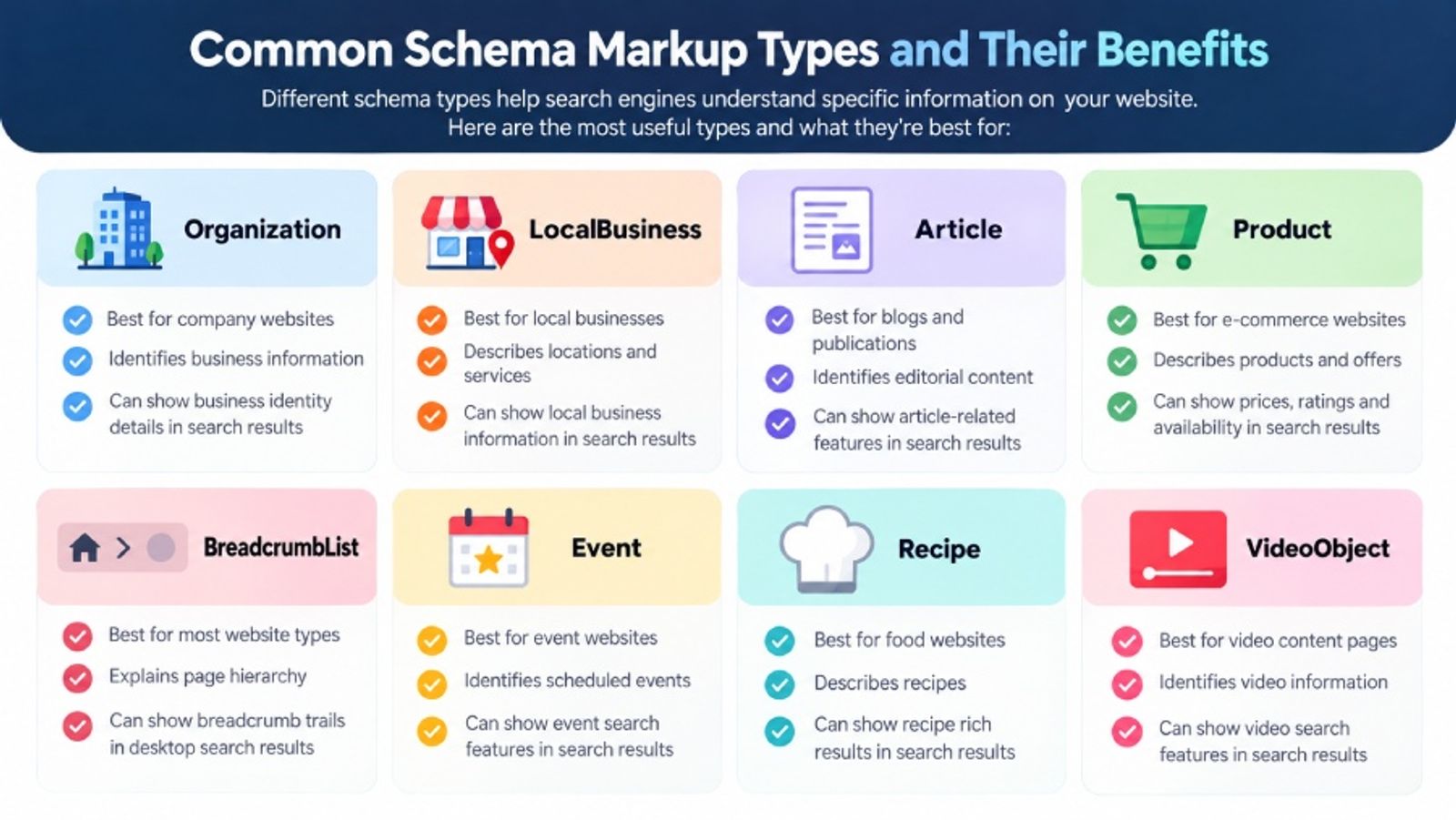
| Schema Type | Best For | Purpose | Potential Search Appearance |
|---|---|---|---|
| Organization | Company websites | Identifies business information | Business identity details |
| LocalBusiness | Local businesses | Describes locations and services | Local business information |
| Article | Blogs and publications | Identifies editorial content | Article-related features |
| Product | E-commerce websites | Describes products and offers | Prices, ratings, availability |
| BreadcrumbList | Most website types | Explains page hierarchy | Desktop breadcrumb trails |
| Event | Event websites | Identifies scheduled events | Event search features |
| Recipe | Food websites | Describes recipes | Recipe rich results |
| VideoObject | Video content pages | Identifies video information | Video search features |
What Is Schema Markup in SEO?
Schema markup is structured data added to a website's HTML to help search engines interpret its content. It uses vocabulary from Schema.org to identify specific information, such as a business name, product price, publication date, or customer review.
For example, a product page may display a price of $89. Schema markup identifies that value as a product price and specifies its currency. This provides additional context that ordinary HTML may not communicate explicitly.
How Does Schema Markup Work?
Schema markup connects website information to predefined properties that search engines can recognize. These properties describe what a page contains and how its elements relate to one another.
Most websites use JSON-LD schema, Google's recommended structured data format. JSON-LD is inserted into a script element within the page's HTML without changing the visible design.
Schema markup works alongside other optimisation practices explained in our guide to What Is On-Page SEO?.
Why Is Schema Markup Important for SEO?
Structured data helps Google understand website content more precisely and identify pages eligible for supported search features. Depending on the schema type, rich results may display product prices, availability, event details, or ratings.
These additional details can make search listings more informative and potentially increase relevant clicks. However, the benefits depend on the content, implementation quality, and Google's decision to display a particular feature.
Does Schema Markup Improve Google Rankings?
Schema markup is not a direct Google ranking factor. Implementing structured data does not automatically improve search rankings or guarantee rich results.
Its main SEO benefit is supporting content understanding and eligibility for enhanced search appearances. Websites still need valuable content, effective internal linking, and a strong technical foundation.
Types of Schema Markup
Different schema markup types serve different purposes. Choosing the right type depends on your website and the specific information presented on each page.
Organization and Local Business Schema
Organization schema identifies a company through properties such as its official name, website, logo, and contact information. It is commonly used on homepages.
Local Business schema adds location-specific details, including addresses, contact numbers, and opening hours. It is particularly relevant to local service providers and can support a wider local SEO growth strategy in Melbourne.
Article and Breadcrumb List Schema
Article schema helps describe blog posts, news articles, and editorial pages. Common properties include the headline, author, publication date, and featured image.
BreadcrumbList schema describes a page's position within a website's navigation structure. Google may use it to display breadcrumb trails in desktop search results, making page relationships easier to understand.
Product and Event Schema
Product schema provides information about individual products, including names, prices, images, stock availability, and genuine reviews. It is especially valuable for online stores.
Event schema identifies scheduled activities such as workshops, conferences, and exhibitions. It can include event dates, locations, organizers, and ticket information.
Explore our technical SEO services and on-page SEO services to strengthen your website's SEO foundation.
Other Useful Schema Types
Additional structured data types include Recipe, Video Object, and Job Posting. Each should be used only when the corresponding content exists on the page and meets the relevant requirements.
Not every schema type produces a Google rich result. For example, Google discontinued FAQ rich results in May 2026, although FAQPage remains part of Schema.org vocabulary.
Schema Markup Examples Using JSON-LD
The following structured data examples demonstrate practical JSON-LD implementation. Replace all fictional names, URLs, dates, and other details with information that accurately matches your website.
Example 1: Article Schema Markup
Article schema is suitable for blogs and educational content. This example describes an article's headline, author, publication date, and featured image.
<script type="application/ld+json">
{
"@context": "https://schema.org",
"@type": "BlogPosting",
"headline": "How to Choose Acoustic Wall Panels",
"image": "https://example.com.au/panels.jpg",
"author": {
"@type": "Person",
"name": "Alex Taylor"
},
"publisher": {
"@type": "Organization",
"name": "Example Design"
},
"datePublished": "2026-10-15",
"dateModified": "2026-10-18"
}
</script>
Ensure that the article headline, author details, image, and dates match the published page.
Example 2: Product Schema Markup
Product schema helps Google understand details about items sold online. The following example includes a product name, image, brand, price, and availability.
<script type="application/ld+json">
{
"@context": "https://schema.org",
"@type": "Product",
"name": "Oak Acoustic Wall Panel",
"image": "https://example.com.au/panel.jpg",
"description": "Decorative acoustic wall panel.",
"sku": "OAK-001",
"brand": {
"@type": "Brand",
"name": "Example Panels"
},
"offers": {
"@type": "Offer",
"url": "https://example.com.au/oak-panel/",
"priceCurrency": "AUD",
"price": "89.00",
"availability": "https://schema.org/InStock"
}
}
</script>
For Australian e-commerce websites, use AUD for prices in Australian dollars. Prices and stock information should always match the actual product listing.
Example 3: LocalBusiness Schema Markup
LocalBusiness schema provides structured information about a physical business location.
<script type="application/ld+json">
{
"@context": "https://schema.org",
"@type": "LocalBusiness",
"name": "Example Design Studio",
"url": "https://example.com.au/",
"address": {
"@type": "PostalAddress",
"streetAddress": "123 Example Street",
"addressLocality": "Melbourne",
"addressRegion": "VIC",
"postalCode": "3000",
"addressCountry": "AU"
}
}
</script>
Real businesses should provide accurate addresses and additional relevant details, such as telephone numbers and opening hours.
Example 4: BreadcrumbList Schema Markup
Breadcrumb markup identifies the hierarchical relationship between website pages.
<script type="application/ld+json">
{
"@context": "https://schema.org",
"@type": "BreadcrumbList",
"itemListElement": [
{
"@type": "ListItem",
"position": 1,
"name": "Home",
"item": "https://example.com.au/"
},
{
"@type": "ListItem",
"position": 2,
"name": "Blog",
"item": "https://example.com.au/blog/"
},
{
"@type": "ListItem",
"position": 3,
"name": "SEO Guide",
"item": "https://example.com.au/blog/seo-guide/"
}
]
}
</script>
Breadcrumb markup should reflect the actual website structure. Clear navigation also complements the internal linking practices discussed in the benefits of using anchor text for SEO.
How to Implement Schema Markup
Schema markup can be implemented manually, through WordPress plugins, or using built-in CMS functionality. The most suitable method depends on the website's platform and technical requirements.
Method 1: Add JSON-LD Manually
Manual JSON-LD implementation provides direct control over structured data.
- Identify the appropriate schema type.
- Create valid JSON-LD using Schema.org properties.
- Insert the code inside a <script type="application/ld+json"> element.
- Add the script to the HTML head or body.
- Publish and validate the page.
This approach is useful for custom websites and developers who need precise control over markup.
Method 2: Use Schema Markup for WordPress
WordPress SEO plugins can automatically generate structured data for common content types, including articles, organisations, products, and breadcrumbs.
Popular options include Yoast SEO and Rank Math. Before installing additional plugins, check whether your theme already generates structured data to prevent conflicts.
Our guide to the best free SEO plugin for WordPress can help you compare available options.
Method 3: Implement Schema Through Your CMS
Platforms such as Shopify and WooCommerce may support structured data through themes, extensions, or built-in functionality.
For websites with many products, template-based implementation helps maintain consistent markup. However, dynamic information such as prices and availability must remain accurate when product details change.
How to Test and Validate Schema Markup
Testing is essential for identifying structured data errors and checking eligibility for Google search features.
Google Rich Results Test
The Google Rich Results Test checks whether structured data meets the technical requirements of Google's supported rich-result types.
Enter the page URL or paste the JSON-LD code, run the test, and review errors or warnings. Fix critical issues before publishing.
Schema Markup Validator
The Schema Markup Validator checks structured data against Schema.org vocabulary. It can identify syntax problems and validate markup that does not have a corresponding Google rich-result feature.
After publishing, use Google Search Console's URL Inspection tool and relevant enhancement reports to monitor Google's understanding of your markup. Passing validation does not guarantee rich-result visibility.
Common Schema Markup Mistakes to Avoid
Even correctly formatted structured data can cause problems when it does not accurately represent the page.
Common schema markup errors include:
- Incorrect schema types: Using Product schema for a general service page.
- Missing properties: Omitting information required for a supported search feature.
- Invalid JSON-LD: Using incorrect syntax, commas, or quotation marks.
- Conflicting markup: Generating inconsistent schema through multiple plugins.
- Outdated information: Displaying incorrect product prices or event dates.
- Misleading content: Adding fabricated reviews, ratings, or information not visible on the page.
- Blocked pages: Preventing search engines from accessing structured data.
Follow Google's structured data guidelines and use accurate, relevant information throughout your implementation.
Schema Markup SEO Checklist
Before publishing structured data, complete these essential checks:
- Choose a schema type that matches the page's content.
- Review the requirements for the intended Google search feature.
- Use correctly formatted JSON-LD.
- Include all required properties.
- Match structured information with visible content.
- Check URLs, images, prices, and dates.
- Remove conflicting or duplicate markup.
- Test using Google Rich Results Test.
- Validate the code with Schema Markup Validator.
- Monitor Google Search Console after publication.
Review structured data regularly, especially after website redesigns, plugin updates, or content changes.
Frequently Asked Questions
Does Schema Markup Improve Google Rankings?
Schema markup is not a direct ranking factor. Its main benefits are helping search engines understand content and making eligible pages suitable for supported rich-result features.
What Are the Most Common Schema Markup Types?
Common types include Organization, LocalBusiness, Article, Product, BreadcrumbList, Event, and Recipe. The appropriate schema depends on the content and purpose of each page.
Is JSON-LD Better Than Microdata?
Google supports JSON-LD, Microdata, and RDFa, but recommends JSON-LD because it is generally easier to implement and maintain without modifying visible HTML elements.
How Can I Test Schema Markup?
Use Google's Rich Results Test to check eligibility for supported features and Schema Markup Validator to check structured data syntax and vocabulary. Search Console can help monitor issues after publication.
Improve Your Website With Effective Schema Markup
Schema markup for SEO helps search engines interpret your website's content and can make relevant pages eligible for enhanced search appearances. Choosing appropriate schema markup types, implementing valid JSON-LD, and regularly testing structured data are essential parts of effective technical SEO.
For businesses looking to improve website structure, search visibility, and overall optimisation, professional support can simplify the process.