
An effective ecommerce SEO checklist helps online stores improve product visibility, attract relevant organic traffic and turn more search visitors into customers. Whether you run a small Shopify store, a WooCommerce website or a large online retail business, optimising your website for search engines is essential for sustainable growth.
However, ecommerce SEO involves more than adding keywords to product descriptions. Your store also needs well-organised categories, accessible product pages, strong internal linking and a technically sound website. This guide explains how to optimise an online store using a practical checklist covering the most important areas of ecommerce SEO.
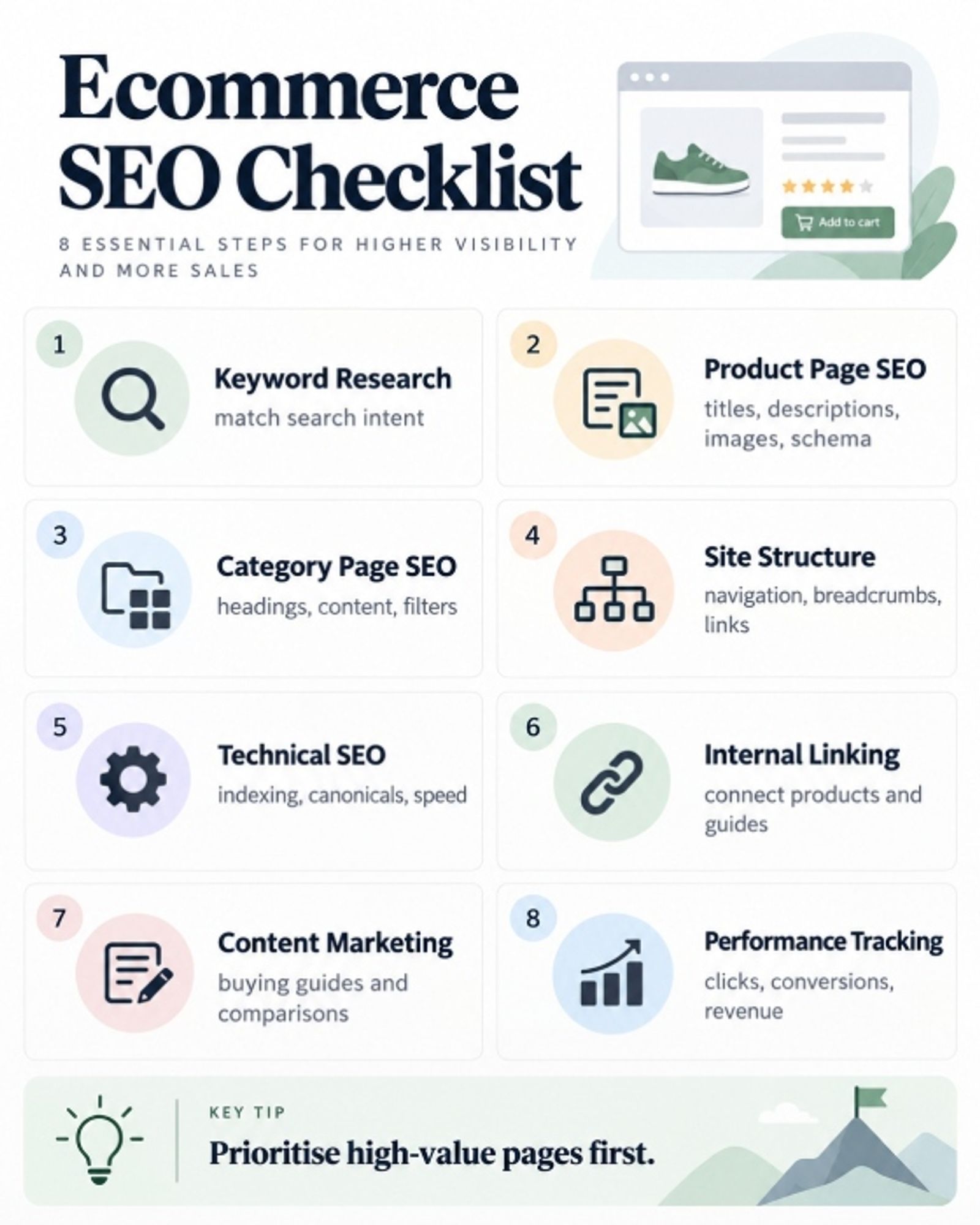
| SEO Task | What to Check | Why It Matters | Priority |
|---|---|---|---|
| Keyword Research | Product and category keywords | Attracts relevant shoppers | High |
| Product Page SEO | Titles, descriptions, images and schema | Improves product discoverability | High |
| Category Page SEO | Headings, content and filtering | Targets broader buying searches | High |
| Site Structure | Navigation, breadcrumbs and links | Helps users and search engines | High |
| Technical SEO | Indexing, speed and duplicate URLs | Supports crawling and usability | High |
| Internal Linking | Product and category connections | Improves content discovery | Medium |
| Content Marketing | Buying guides and comparisons | Reaches customers researching products | Medium |
| Performance Tracking | Organic traffic, sales and conversions | Measures SEO effectiveness | Ongoing |
Ecommerce SEO Checklist at a Glance
Before making detailed improvements, review your online store against these essential ecommerce SEO best practices.
- Research relevant product and category keywords.
- Optimise product titles and meta descriptions.
- Write helpful, distinctive product descriptions.
- Improve category headings and supporting content.
- Create clear navigation and breadcrumb links.
- Check indexability, canonical tags and XML sitemaps.
- Improve page speed and mobile usability.
- Add appropriate product structured data.
- Build relevant internal links between pages.
- Monitor organic traffic, conversions and revenue.
Start with tasks that affect your most valuable pages. For example, resolving an indexing problem across hundreds of product pages may provide greater value than rewriting a single low-traffic description.
Download the printable ecommerce SEO checklist PDF provided with this guide to track your progress.
Keyword Research for Ecommerce Websites
Effective ecommerce keyword research identifies the phrases potential customers use when searching for products. The goal is to match each important page with relevant search intent rather than targeting the same broad keywords throughout your website.
Identify Product and Category Keywords
Category pages usually target broader commercial searches, while product pages focus on specific products, brands, models or features.
For example, an Australian retailer selling reusable drink bottles might target:
| Page Type | Example Keyword | Search Intent |
|---|---|---|
| Category | Stainless steel water bottles | Browse products |
| Subcategory | Insulated water bottles | Compare options |
| Product | 1L insulated stainless steel water bottle | Find a specific product |
| Blog Article | How to choose an insulated water bottle | Research before buying |
Use tools such as Google Search Console, Google Keyword Planner and dedicated SEO platforms to find keyword opportunities. Evaluate search intent, competition, commercial relevance and existing rankings before choosing targets.
Create a Keyword Mapping Plan
Assign a primary keyword and supporting terms to each important URL. This reduces unnecessary competition between your own pages and helps maintain a clear content structure.
For example, the main insulated water bottle category should target the broader category query, while individual product pages focus on their specific models and specifications.
Review the search results before creating another landing page. If two keywords have essentially the same intent, one well-optimised page may be more useful than multiple similar pages.
Optimise Product Pages for SEO
Product page SEO is one of the most important parts of online store optimisation. Product pages must help search engines understand what you sell while providing enough information for customers to make confident purchasing decisions.
Write Effective Product Titles and Descriptions
Use descriptive page titles that include the product name and relevant attributes. Avoid adding unnecessary keywords or repeating the same generic title across your catalogue.
For example:
Weak title: Water Bottle – Best Quality – Buy Online
Improved title: 1L Insulated Stainless Steel Water Bottle | Brand Name
A useful product description explains the item's features, materials, dimensions, compatibility, benefits and ideal uses. Include important specifications in an easy-to-scan format.
Do not simply duplicate manufacturer descriptions across every product. Add original information that answers customer questions and distinguishes each item from similar alternatives. Learn more about these fundamentals in our guide to What Is On-Page SEO?.
Optimise Product Images and URLs
Images help customers understand products, but unnecessarily large files can slow down your website.
Use high-quality images with appropriate dimensions, modern compression formats where supported, and descriptive filenames. For example, black-insulated-water-bottle.webp is more informative than IMG0045.webp.
When optimising product image alt text, describe the visible product naturally. Avoid repeating keywords or adding details that are not shown in the image.
Keep URLs short and descriptive, such as:
example.com/products/1l-insulated-water-bottle/
Where possible, avoid confusing product identifiers and unnecessary URL parameters.
Add Product Schema Markup
Product structured data helps Google interpret details such as product names, prices, availability and reviews.
For ecommerce product pages, use appropriate Product and Offer structured data, including accurate pricing and availability information. Depending on eligibility, this information may support enhanced product appearances in Google Search.
Google's Product structured data documentation explains the requirements. You can also explore our guide to schema markup for ecommerce product pages.
Remember that implementing schema does not guarantee rich results or higher rankings.
Optimise Category Pages
Category pages help online stores rank for broader commercial keywords and guide shoppers towards relevant products. Strong category page SEO combines useful content, logical product organisation and accessible navigation.
Improve Category Content and Headings
Give each important category a descriptive H1 heading that reflects its products. Add a short introduction explaining what shoppers can find, followed by useful supporting information where appropriate.
For example, an insulated water bottle category could explain available capacities, insulation types, materials and common uses.
Avoid publishing long blocks of generic, repetitive text simply to increase word count. Category content should help customers compare options and choose suitable products.
Manage Filters and Product Listings
Filters for size, colour, price and brand improve shopping experiences, but can generate excessive URLs when each combination creates a separate address.
Decide which filtered pages deserve search visibility based on demand and unique value. Most sorting and filtering combinations do not need independent indexable pages.
Also ensure that search engines can reach products through crawlable category links and pagination, rather than relying entirely on internal search or JavaScript interactions.
Improve Ecommerce Site Structure
A logical website structure makes it easier for shoppers to find products and helps search engines discover important pages.
Ideally, users should be able to navigate from the homepage to categories, subcategories and products without unnecessary steps.
Use Clear Navigation and Breadcrumbs
Organise your website around logical product groups.
For example:
Home → Drinkware → Insulated Water Bottles → 1L Stainless Steel Bottle
This structure provides visitors with context and creates natural internal linking opportunities.
Include descriptive navigation labels and breadcrumb links where appropriate. Important category and product pages should not depend entirely on a search box for discovery.
Make Important Pages Easy to Reach
Regularly review how many navigation steps are required to reach valuable product pages. There is no universal maximum click depth, but important products should be reasonably accessible.
Link to popular categories, bestselling products and relevant collections from appropriate locations throughout your store.
Google's guidance on ecommerce site structure highlights the importance of crawlable links for product discovery.
Technical SEO Checklist for Online Stores
Technical SEO for ecommerce ensures search engines can access, understand and index your most important pages. Problems with duplicate URLs, crawling restrictions or page performance can affect large sections of an online catalogue.
Check Crawling and Indexing
Review Google Search Console to identify pages that are excluded from Google's index and investigate the reasons.
Check that:
- Important pages return successful HTTP responses.
- Valuable product and category pages are indexable.
- Robots directives are configured correctly.
- XML sitemaps contain preferred, indexable URLs.
- Internal links point to the correct page versions.
Submitting a sitemap helps search engines discover URLs, but does not guarantee that every page will be indexed.
Fix Duplicate URLs and Canonical Tags
Online stores frequently generate multiple URLs for the same product through categories, tracking parameters and sorting options.
Use canonical tags to indicate the preferred URL for duplicate or substantially similar pages. Keep internal links, sitemaps and canonical signals consistent.
Remember that canonical tags are signals rather than strict instructions. They also do not prevent search engines from crawling unwanted URLs.
For faceted navigation, choose an appropriate strategy based on whether filtered pages should be indexed and how much unnecessary crawling they generate.
If your store experiences indexing difficulties, duplicate URLs or website performance problems, specialist technical SEO services can help identify and address the underlying issues.
Improve Page Speed and Mobile Usability
A slow or difficult-to-use shopping experience can discourage customers from exploring products or completing purchases.
Review Core Web Vitals and prioritise improvements such as image optimisation, efficient scripts, sensible caching and stable page layouts.
Test product pages, category pages and checkout journeys on mobile devices. Make sure navigation, product selectors and purchase buttons remain easy to use.
Handle Out-of-Stock and Discontinued Products
Temporarily unavailable products should generally remain accessible when they still provide value and are likely to return.
Keep their descriptions and reviews available, clearly communicate stock status and offer relevant alternatives. Update structured data and product feeds accordingly.
For permanently discontinued products, choose the most appropriate treatment:
- Close replacement available: Consider a 301 redirect to a genuinely equivalent product.
- No suitable replacement: Return an appropriate 404 or 410 status if the page is being removed.
- Page still useful: Consider retaining it with accurate discontinued information and relevant alternatives.
Avoid automatically redirecting every removed product to the homepage, as this often creates a poor user experience.
Review Product Variants and Structured Data
Products available in different colours or sizes may require distinct URLs and appropriate variant markup, depending on the store's setup.
Ensure Google can identify relevant variants and that structured data matches the visible product information.
Validate changes using Google's Rich Results Test and regularly check the Merchant Listings reports in Search Console.
For businesses looking to improve organic visibility and grow their online sales, professional ecommerce SEO services in web like web team can help develop a targeted optimization strategy.
Improve Internal Linking
Internal linking connects related pages and helps search engines understand relationships between products, categories and informational content.
A strong internal linking strategy should prioritise useful navigation rather than inserting unnecessary links into every paragraph.
Connect Products, Categories and Guides
Add relevant links between related products, complementary items, category collections and buying guides.
For example, a guide about choosing a coffee machine could link naturally to espresso machine categories, coffee grinders and suitable accessories.
Use descriptive anchor text that explains the destination. Our guide to the benefits of using anchor text for SEO explains why meaningful links matter.
Review your store for orphan pages that receive no useful internal links, particularly newly published products and important subcategories.
Ecommerce Content Marketing
Content marketing allows online stores to reach customers before they are ready to buy. Educational articles can introduce products, answer questions and support internal linking.
Create Buying Guides and Comparison Articles
Publish articles that address genuine customer decisions, such as:
- How to Choose the Right Coffee Machine
- Stainless Steel vs Glass Water Bottles
- Best Outdoor Furniture Materials for Australian Conditions
- How to Measure Your Space for a Dining Table
Focus on helping readers make informed choices. Include practical comparisons, product specifications and links to relevant collections.
Avoid producing several articles that answer essentially the same question without adding value.
Answer Common Customer Questions
Use customer service enquiries, product reviews and search data to identify recurring questions.
Topics such as product sizing, compatibility, cleaning, durability, warranties and delivery can support helpful FAQs.
Add the answers to the most relevant product, category or buying-guide pages rather than creating unnecessary standalone pages for every question.
Track Ecommerce SEO Performance
SEO improvements should be measured through search visibility and business results, not rankings alone.
Use Google Search Console alongside your ecommerce analytics platform to understand how shoppers find your store and what happens after they arrive.
Monitor Organic Search Performance
Track important metrics including:
Key Ecommerce SEO Metrics to Track
Track these key ecommerce SEO metrics to understand your search visibility, measure organic traffic, and evaluate how effectively your online store turns visitors into customers.
| Metric | What It Measures |
|---|---|
| Organic Clicks | Visits from unpaid search results. |
| Search Impressions | How often your pages appear in search results. |
| Organic Conversions | Purchases or other conversions from organic traffic. |
| Organic Revenue | Revenue attributed to organic search traffic. |
| Conversion Rate | Percentage of visitors who complete a purchase. |
| Indexed Pages | URLs Google has added to its search index. |
Compare performance over meaningful periods and separate branded searches from non-branded searches where possible.
Review Results and Prioritise Improvements
Check performance monthly to identify growing categories, declining product pages and important pages with weak click-through rates.
Investigate changes before making major revisions. Seasonal demand, inventory changes, tracking problems and algorithm updates can all influence results.
Use your findings to prioritise improvements based on commercial impact, implementation effort and the likelihood of resolving an identifiable issue.
Common Ecommerce SEO Mistakes to Avoid
Even well-designed online stores can experience poor organic visibility because of avoidable optimisation mistakes.
Common problems include:
- Duplicate product descriptions: Reusing generic descriptions without useful product-specific details.
- Thin category pages: Providing little guidance beyond a basic product grid.
- Uncontrolled filter URLs: Allowing sorting and filtering combinations to generate excessive crawlable URLs.
- Broken internal links: Linking to removed products or outdated categories.
- Incorrect canonical tags: Pointing important pages towards inappropriate alternatives.
- Inaccurate product schema: Displaying outdated pricing or availability information.
- Ignoring mobile performance: Creating difficult shopping experiences on smaller screens.
Many of these issues can be identified through a structured SEO audit. If your store uses WordPress or WooCommerce, choosing an appropriate optimisation plugin may also help. See our guide to the best free SEO plugins for WordPress for more information.
However, plugins cannot replace a well-planned SEO strategy, useful content and appropriate technical configuration.
Ecommerce SEO FAQs
What Is Ecommerce SEO?
Ecommerce SEO is the process of improving an online store's visibility in unpaid search results. It includes keyword research, product page optimisation, category content, internal linking, technical SEO and performance monitoring.
How Long Does Ecommerce SEO Take?
Ecommerce SEO is an ongoing process. Some technical improvements can affect crawling or indexing relatively quickly, while meaningful growth in competitive organic search traffic may take several months or longer.
Results depend on your website's condition, competition, product range and the quality of implementation.
Should Every Product Have a Unique Description?
Important products should have distinctive, useful information that helps customers understand their features and differences. This does not mean every common specification must be rewritten.
Products that share characteristics can use consistent technical details, provided their pages clearly explain relevant differences.
Does Product Schema Improve SEO?
Product schema helps search engines understand product information and can make eligible pages available for enhanced search appearances.
However, adding structured data does not automatically improve rankings or guarantee rich results. The markup must accurately represent the product and meet Google's requirements.
Improve Your Online Store's SEO Performance
Following an ecommerce SEO checklist makes it easier to identify optimisation opportunities, resolve technical issues and improve how customers discover your products.
Start with keyword research, important category and product pages, indexing problems and website usability. Then strengthen internal linking, publish helpful content and monitor the commercial impact of your improvements.